The Mixer
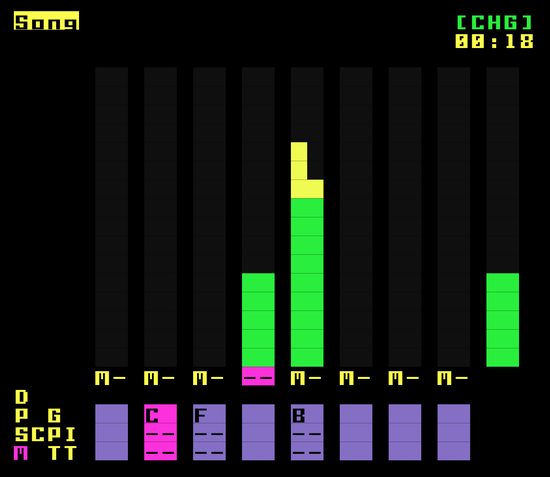
The Mixer screen provides a visual overview and control center for the audio levels of each channel in your song, as well as the master output. It allows you to quickly adjust volumes, monitor audio levels and mute/solo individual channels.
Mixer Channels
The Mixer screen displays a set of vertical stereo level (VU) meters, one for each of the eight available channels. Each channel strip represents a single stereo channel in your song and provides the following information:
- Channel Level Meter: 2 vertical bars representing the left and right channels that dynamically displays the current audio level of the channel. The higher the bar, the louder the channel's output.
- Mute: Each channel can be muted. The 'M' under each channel indicates when a channel is muted.
Master Output
The rightmost section of the Mixer screen displays the Master Output level meter. This meter shows the combined audio level of all channels after they have been mixed together.
- Master Level Meter: Similar to the channel level meters, the master level meter displays the overall audio level of the final mix.
- Clip Indicator: The master level meter has a red clip indicator at the top. If this is lit, the master output is clipping and the audio will be distorted.
VU Meter Details
The VU meters are designed to give you a clear visual representation of the audio levels. Here's a breakdown of the meter's features:
- Dynamic Bars: The bars move in real-time, reflecting the current audio level in dB.
- Color-Coded Regions:
- Green: Indicates a safe and healthy audio level.
- Yellow: Indicates that the audio level is approaching the maximum.
- Red: Indicates that the audio level is clipping.
- Stereo: Each VU meter is stereo, with the left channel on the left and the right channel on the right.
Controls
The mixer screen is primarily a monitoring tool, but it also provides same channel control key combos as are available on the song screen:
NAV+EDIT: Toggles mute/unmute of cursor channel- if
NAVis released beforeEDIT, channel stays mutes - if
EDITis released beforeNAV, channel goes back to original state
- if
NAV+ENTER: Solo cursor channel- if
NAVis released beforeENTER, channel stays solo'ed - if
ENTERis released beforeNAV, all channel go back to original state
- if
ALT+NAV: restore full playback on all channels