Project Management
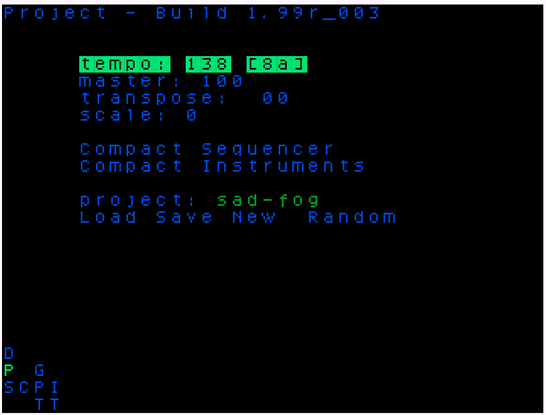
On the project screen you can change various settings for the current project, save it, rename it (including giving it a random name), create a new blank project, or browse for another project to load. You can also render your song to audio files.
Your current project settings are saved automatically every minute except when the sequencer is running (i.e., when the current project is playing). This means that should you restart the picoTracker, accidentally power off, or if a crash occurs, your project state from within the last minute will be restored.
You can explicitly save the current project by selecting Save. This is recommended before performing major changes or after a successful session.
Current Project Settings
- tempo: Can be set between 60bpm and 400bpm. You can also tap tempo: move the cursor to the
tempofield and press EDIT repeatedly in time. - master vol: Sets the overall master output volume from 0% to 100%.
- transpose: Live transposition of every triggered instrument in semitones (-48 to +48).
- scale: Set the scale that will be applied to all notes entered in the project. When entering a note in the Phrase screen, you will only be able to enter notes that belong to the selected scale. See the reference for a list of all available scales.
- scale root: Sets the root note for the selected scale (e.g., C, C#, D, etc.).
For best tap tempo results, tap at least 2-3 times at a steady pace. If taps are too far apart, tap detection restarts from the latest tap.
Project Optimization
- Sample Pool: Opens the sample import browser specifically for the project's local sample directory. This allows you to manage and import samples directly into your project's folder.
- Remove Unused Samples: Scans the project's sample folder and removes any audio files that are not currently used by any instrument in the project.
- Remove Unused Instruments: Resets all instruments that are not used in any phrase to their default state and removes their associated samples from the project.
Project Management
- project: Displays the current name of the project. To edit the name:
- Hold ENTER and use UP / DOWN to change the character at the cursor.
- Hold ENTER and use LEFT / RIGHT to move the cursor.
- Press RIGHT at the end of the name to add a new character.
- Press EDIT to delete the character at the cursor. The project name is limited to 16 characters.
- Browse: Go to the project file browser to load a different project.
- Save: Save the current project state to disk. NOTE: Saving cannot be done during playback.
- New: Replaces the current project with a new, blank project. A confirmation dialog will appear.
- Random: Generates a new, random name for the current project.
Rendering
You can render your song to audio files (.wav) directly on the picoTracker. Rendering starts from the last played row in the Song screen and continues until the song ends.
Note: Rendering is only possible if the first row of your song (Row 00) contains at least one phrase.
- Mixdown: Renders the entire song to a single stereo master file in the
/rendersfolder on your SD card. - Stems: Renders each of the 8 channels to separate audio files (stems) simultaneously in the
/rendersfolder.
During rendering, a progress bar is shown. You can cancel the process at any time by pressing OK. For more details, see the Renders and Stems page.