Phrase Screen
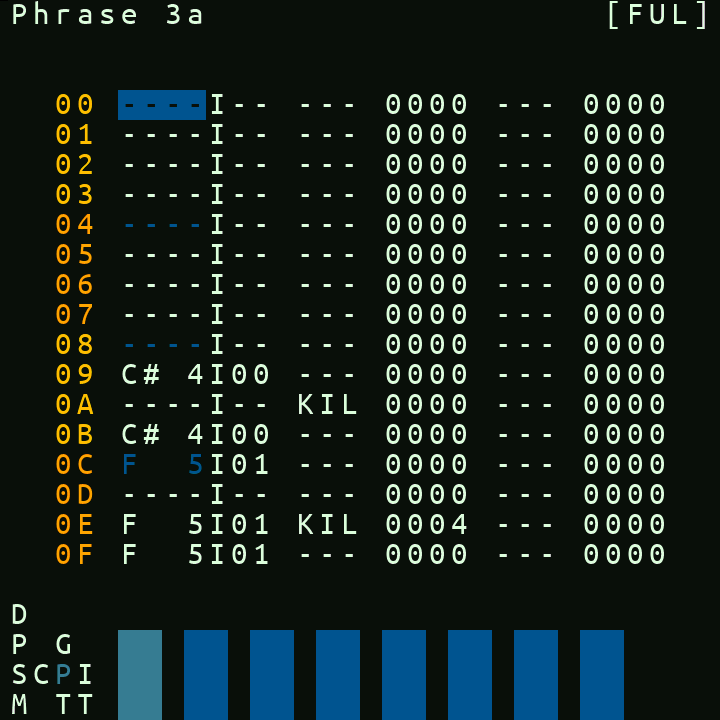
- The top of the phrase screen displays the name of the instrument under your cursor.
- The seven columns of the phrase screen, from left to right are:
- row counter
- note trigger
- instrument number
- FX1 command
- parameters for FX 1
- FX2 command
- parameters for FX2
In the note trigger column,
RELreleases the currently playing note on that channel. You set release by doing EDIT+ENTER on a unset note value, ie.----.
You can use the all the standard picoTrackerkey editing combos for editing on the phrase screen.
You can clone an instrument in the phrase screen by pressing ALT + (EDIT, ENTER) on instrument number in phrase screen. With a selection active, press ENTER+PLAY to resample the selected phrase rows.
Phrase resampling renders only the selected rows, writes resample.wav into the current project's samples folder, and loads it into the sample pool.
Interpolating Notes and Velocity
To fill a range evenly between two values, make a selection in a single phrase column spanning at least three rows, then press ENTER. The first and last selected rows are the endpoints; picoTracker replaces the values on the rows between them with a linear interpolation.
Interpolation supports:
- The note column, when both endpoints contain notes (not
----orREL). - Either FX parameter column, when both endpoint commands are
VEL. Intermediate rows are set toVEL, and their values are limited to the MIDI range00-7F.
The selection must contain only the note column or one FX parameter column.
In Song mode Play starts and stops playback from Step 00, soloing the current phrase
In Live mode Play queues the Edited Chain Step from 00
In Song mode Play+NAV starts/stops playback of the whole song from where the current phrase appears in the song
Tied Notes / Legato Slides
You can create smooth, continuous transitions between notes on a track by leaving the instrument column e
mpty when entering a new note. This "ties" the new note to the previous one, continuing the existing voice without retriggering. If LEG aaxx command is used, the transition will slide smoothly at aa speed.
For example, entering C-4 01 followed by E-4 -- LEG 1000 (with no instrument number on the second note) will play the instrument at C-4, then slide to E-4 without stopping and rettrigering the note. This is especially useful with:
- Tables are not stopped, running commands are not stopped and phase of oscillator and any envelopes for that instrument are not reset
- Sample instruments with long sustain for legato melodies
- MIDI instruments for external synth portamento or tied note glides (eg. "303 style" bass synths).
See the FX Commands Reference for more details on LEG and PSL behavior.
Example:
| Column 1 | Column 2 | Column 3 | Column 4 |
|----------|----------|----------|----------|
| Note     | Instr    | FX1      | Param1   |
| C-4      | 01       |          |          |
| E-4      |          | LEG      | 1000     |
| G-4      |          | LEG      | 1000     |
In the phrase screen excerpt above:
C-4plays with instrument 1 (01)E-4is tied to the previous note andLEG 1000slides up to it over four steps; the instrument continues without retriggeringG-4is also tied and starts another four-step slide from E-4 to G-4
Behavior by instrument type
Sample Instruments (SAMPLE and ORIGINAL SAMPLE)
When tied:
- The envelope (attack, decay, sustain, release) is not reset — it continues from where it was
- The sample playback position is preserved, so no click or gap occurs
- The pitch changes smoothly to the new note
- This works with any instrument type: Sample as well as ORIGINAL SAMPLE instruments
MIDI Instruments
When tied:
- A new MIDI Note-On message is sent for the new note before the previous Note-Off is sent
- This allows external synthesizers to maintain their envelopes and play portamento/glissando smoothly for that classic 303 sound
- If the same note is tied (same pitch), no MIDI messages are sent at all (no-op)
- Pitch bend from
LEGorPSLcommands persists across tied notes